
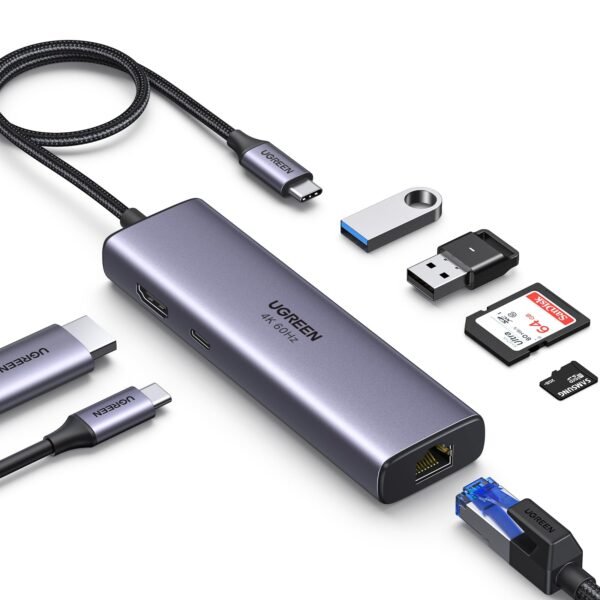
Port Configuration (Standard 7-in-1 Layout)
While brands vary slightly, a standard 7-in-1 hub generally offers these seven connections:3
| Port | Specification / Capability |
| 1 x HDMI | Supports 4K @ 30Hz or 60Hz (depending on the model). |
| 1 x USB-C PD | Power Delivery up to 100W (charges your laptop through the hub). |
| 1 x USB-C Data | A dedicated Type-C port for fast data transfer (not for charging). |
| 2 x USB 3.0 | High-speed USB-A ports (5Gbps) for hard drives or mice. |
| 1 x SD Slot | Full-sized card reader for cameras. |
| 1 x MicroSD (TF) | Small card reader for phones, drones, or dashcams. |
Key Features
-
Massive Expansion: Turn a single port into a workstation hub for monitors, keyboards, and storage.4
-
Pass-Through Charging: Most 7-in-1 hubs support 100W PD-In, providing around 85W–90W of actual charge to your laptop after the hub takes its small share of power.5
-
Compact & Travel-Ready: Without the bulky RJ45 (Ethernet) housing, these hubs are often significantly thinner than 8-in-1 models, fitting easily into a laptop sleeve.6
-
Simultaneous Card Reading: High-quality 7-in-1 hubs allow you to read from both the SD and MicroSD slots at the same time.7
Pricing Context (Nigeria 2025)
In the local market, the 7-in-1 hub is very popular due to its versatility:
-
Entry-Level (Generic/TiLECC): ₦8,000 – ₦15,000
-
Mid-Range (Baseus/UGREEN): ₦28,000 – ₦45,000
-
Premium (Anker/Satechi): ₦65,000 – ₦85,000
Pro-Tip: Check Your Laptop’s USB-C Port
For this hub to output video (HDMI), your laptop’s USB-C port must support “DisplayPort Alt Mode” or Thunderbolt. If your port is “Data Only,” the HDMI port on the hub will not work, though the USB ports and card readers will.

Reviews
There are no reviews yet.