
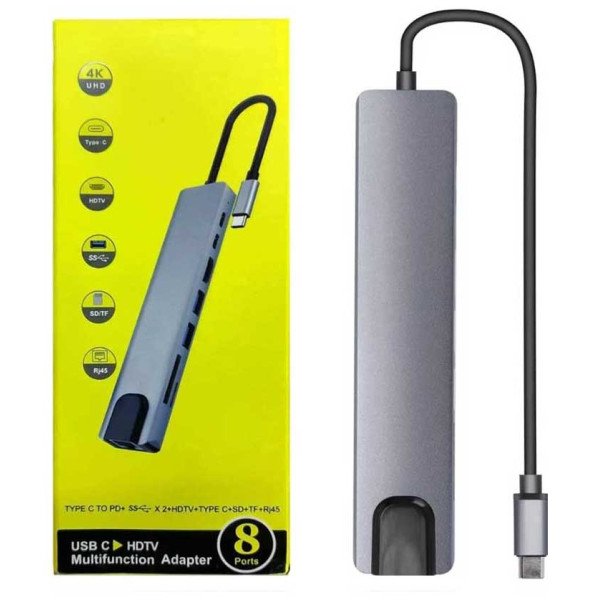
Port Configuration (The “8-in-1” Breakdown)
Most 8-in-1 adapters on the market follow this standard layout:
| Port Type | Specification / Capability |
| 1 x HDMI (HDTV) | Supports 4K @ 30Hz (3840 x 2160) or 1080p @ 60Hz. |
| 1 x RJ45 Ethernet | Usually 100Mbps (Fast Ethernet) or 1000Mbps (Gigabit). |
| 1 x USB-C PD | Power Delivery port (up to 87W or 100W) to charge your laptop. |
| 2 x USB 3.0 | High-speed data transfer up to 5Gbps (for hard drives/flash drives). |
| 1 x USB 2.0 | Optimized for wireless mice or keyboards (reduces interference). |
| 1 x SD Card Slot | For full-sized camera memory cards. |
| 1 x TF/Micro SD | For phone or drone memory cards. |
Key Features
-
4K Visuals: The “HDTV” port allows you to mirror or extend your laptop screen to a TV, projector, or monitor for presentations or movie nights.5
-
Pass-Through Charging: You don’t lose your charging port; you plug your laptop’s charger into the hub’s PD port, and it powers the laptop while the hub is in use.6
-
Stable Internet: The RJ45 port provides a wired connection, which is significantly more stable than Wi-Fi for gaming or video conferencing.7
-
Universal Compatibility: Works with MacBook Pro/Air, iPad Pro (USB-C models), Samsung Galaxy (DeX mode), and most modern Windows laptops.

Reviews
There are no reviews yet.